
Signing Git Commits with GPG
Setting up Git and GPG to cryptographically sign commits.
Contents
GitLab has supported signed commits using GNU Privacy Guard (GPG) for a while now. In this article I describe the steps to set up a GPG key and how I use it to sign my commits.
Update Sept. 2020: Added a section on adding the GPG key to your GitHub account.
Configure a GPG Key
Create a New GPG Key
If you don’t have a suitable GPG key yet, you can easily create a new key pair with gpg:
gpg --full-gen-keyWhen creating the key, it is important to enter the same email address that is registered with your GitLab account.
Extend an Existing GPG Key
If you want to use an existing GPG key, the email address registered with your GitLab account must be added to the key as an additional “user ID”.
To do so, list all keys…
gpg --list-secret-keys --keyid-format LONG… and note down the ID of the one you want. The output can contain several private keys. In the following example, the ID 352422B00B179048 of the key is in the line starting with sec:
sec   rsa4096/352422B00B179048 2014-08-23 [SC] [expires: 2017-08-23]
      B47F9BA26DEE50629620DB72352422B00B179048
uid              [ ultimate ] Thomas Hartl <thomas.hartl@soltari.at>
ssb   rsa4096/8DE66AE00599CC0D 2014-08-23 [E] [expires: 2017-08-23]
With this information, the key can be extended with the “user ID”:
gpg --edit-key 352422B00B179048
gpg> adduid
[... follow the wizard's instructions ...]
gpg> save
Add the Public GPG Key
Export the GPG Key
The public GPG key (Public key) now has to be exported and then added to your GitLab account. To do so, display the public key and copy it including the lines -----BEGIN PGP PUBLIC KEY BLOCK----- and -----END PGP PUBLIC KEY BLOCK-----:
gpg --armor --export 352422B00B179048Add It to Your GitLab Account
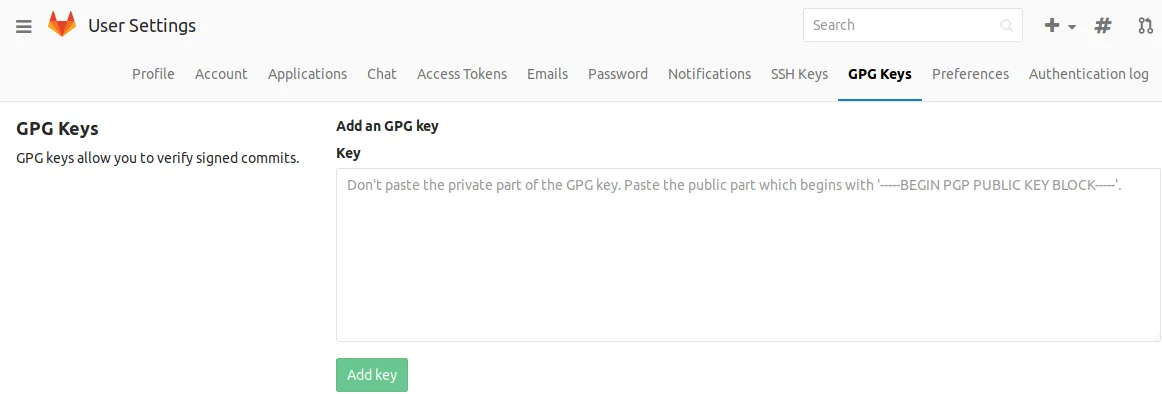
Add the Public key under “GPG Keys” in your GitLab user settings:
Add It to Your GitHub Account
In GitHub, the key can be added under Settings > SSH and GPG keys.
Configure the GPG Key in Git
The following command tells Git to use the GPG key with ID 352422B00B179048 for signing:
git config --global user.signingkey 352422B00B179048Sign Commits
There are two ways to actually sign commits:
Either sign individual commits with the -S parameter:
git commit -S -m "This is a signed commit."Or set the Git option commit.gpgsign to sign all commits by default:
git config --global commit.gpgsign trueSources
- Git-SCM: Signing Your Work
- GitLab: Sign commits with GPG
- GitHub: Adding a GPG key to your GitHub account