
Azure Lighthouse Demo
An Azure Lighthouse demo setup with code samples.
Contents
Scenario
For the Azure Lighthouse demo I assume the following scenario:
- The service provider (CSP) “Tom Demo Inc.” offers customers two service packages for the Azure cloud:
- Azure Support & Monitoring: the CSP’s staff monitor the customer’s Azure resources.
- Security: the CSP’s Security Operations Center (SOC) watches over the security of the customer’s Azure resources.
- Customers can book these packages for their Azure subscriptions (or individual resource groups).
- The CSP’s staff access the customer’s resources transparently with Azure Lighthouse. This means customers don’t have to “invite” any of the CSP’s users into their Entra ID tenant.
Service Provider Setup
Security Groups
For the demo I prepared two security groups for Lighthouse in my dev Entra tenant “dev.soltari.at”:
az ad group list --filter "startswith(displayname, 'IT-AzLighthouse')" --query "[].{Name:displayName, Id:id, Description:description}" -o table

Name                   Id                                    Description
---------------------  ------------------------------------  ----------------------------------------------------------
IT-AzLighthouse-ITOps  6cafe89d-a817-4dd5-9ae9-cd42d4e5cb58  IT Operations team, used for Azure Lighthouse
IT-AzLighthouse-SOC    b0ab3638-e33f-47c1-a37a-614775a25c19  Security Operations Center team, used for Azure Lighthouse
These security groups contain users who will get different permissions in the customer’s Azure subscriptions through Lighthouse. Here, for example, is the SOC group:
az ad group member list --group b0ab3638-e33f-47c1-a37a-614775a25c19 --query "[].{Name:displayName, Id:id, UPN:userPrincipalName, JobTitle:jobTitle}" -o table

Name         Id                                    UPN                    JobTitle
-----------  ------------------------------------  ---------------------  ----------------
Adele Vance  09af75ca-a16b-4d7f-bfd4-b791491ca628  AdeleV@dev.soltari.at  Security Analyst
Lighthouse Offer
Azure Lighthouse “offers” use the ARM format and, as is usual with ARM, consist of two JSON files: the template itself and a parameter file.
For the demo I use a slightly modified “multi-resource-group” template from the official Lighthouse GitHub repository: multi-rg.json and multiple-rg.parameters.json.
The template’s five parameters, briefly explained:
- mspOfferName is the display name of the “offer” that the customer will see in Azure Lighthouse.
- mspOfferDescription is the description, which is also visible to the customer.
- managedByTenantId contains the Microsoft Entra tenant ID of the CSP. In this case it is the ID of my “dev.soltari.at” tenant,
1d8c4cee-85e5-40c0-b55f-000000000000(anonymized). - authorizations defines the “authorizations” the CSP receives on the customer’s resource groups. Specifically, these are Azure roles assigned to the CSP’s staff via RBAC. The IDs of the Azure roles can be found in the documentation under Azure built-in roles. Which of my groups gets which roles is described below.
- resourceGroups contains a list of the resource group names in the customer’s Azure environment to which the Lighthouse “authorizations” are applied.
It makes sense to set default values for all parameters except resourceGroups.
Parameters for the Support & Monitoring Service
For the “Support & Monitoring” services, our “IT Operations” security group should get the following roles:
b24988ac-6180-42a0-ab88-20f7382dd24cContributor91c1777a-f3dc-4fae-b103-61d183457e46Managed Services Registration assignment Delete, so the CSP can remove the permissions in the customer’s tenant itself.
{
  "$schema": "https://schema.management.azure.com/schemas/2015-01-01/deploymentParameters.json#",
  "contentVersion": "1.0.0.0",
  "parameters": {
    "mspOfferName": {
      "value": "Azure Support & Monitoring Services"
    },
    "mspOfferDescription": {
      "value": "Support and monitoring by Tom Demo Inc. for your Azure environment."
    },
    "managedByTenantId": {
      "value": "1d8c4cee-85e5-40c0-b55f-000000000000"
    },
    "authorizations": {
      "value": [
        {
          "principalId": "6cafe89d-a817-4dd5-9ae9-cd42d4e5cb58",
          "roleDefinitionId": "b24988ac-6180-42a0-ab88-20f7382dd24c",
          "principalIdDisplayName": "IT-AzLighthouse-ITOps"
        },
        {
          "principalId": "6cafe89d-a817-4dd5-9ae9-cd42d4e5cb58",
          "roleDefinitionId": "91c1777a-f3dc-4fae-b103-61d183457e46",
          "principalIdDisplayName": "IT-AzLighthouse-ITOps"
        }
      ]
    }
  }
}
Parameters for the Security Operations Service
For the “Security Operations” services, our “SOC” security group should get the following roles:
acdd72a7-3385-48ef-bd42-f606fba81ae7Readerab8e14d6-4a74-4a29-9ba8-549422addadeMicrosoft Sentinel Contributorfb1c8493-542b-48eb-b624-b4c8fea62acdSecurity Admin
{
  "$schema": "https://schema.management.azure.com/schemas/2015-01-01/deploymentParameters.json#",
  "contentVersion": "1.0.0.0",
  "parameters": {
    "mspOfferName": {
      "value": "Azure Security Operations Services"
    },
    "mspOfferDescription": {
      "value": "The managed Security Operations Center by Tom Demo Inc. for your Azure environment."
    },
    "managedByTenantId": {
      "value": "1d8c4cee-85e5-40c0-b55f-000000000000"
    },
    "authorizations": {
      "value": [
        {
          "principalId": "b0ab3638-e33f-47c1-a37a-614775a25c19",
          "roleDefinitionId": "acdd72a7-3385-48ef-bd42-f606fba81ae7",
          "principalIdDisplayName": "IT-AzLighthouse-SOC"
        },
        {
          "principalId": "b0ab3638-e33f-47c1-a37a-614775a25c19",
          "roleDefinitionId": "ab8e14d6-4a74-4a29-9ba8-549422addade",
          "principalIdDisplayName": "IT-AzLighthouse-SOC"
        },
        {
          "principalId": "b0ab3638-e33f-47c1-a37a-614775a25c19",
          "roleDefinitionId": "fb1c8493-542b-48eb-b624-b4c8fea62acd",
          "principalIdDisplayName": "IT-AzLighthouse-SOC"
        }
      ]
    }
  }
}
Multi-Resource-Group ARM Template
The ARM template is designed so the customer can apply it to several resource groups at once. It uses the ARM “copy” syntax (see lines 52 to 57).
{
  "$schema": "https://schema.management.azure.com/schemas/2018-05-01/subscriptionDeploymentTemplate.json#",
  "contentVersion": "1.0.0.0",
  "parameters": {
    "mspOfferName": {
      "type": "string",
      "metadata": {
        "description": "Specify a unique name for your offer"
      }
    },
    "mspOfferDescription": {
      "type": "string",
      "metadata": {
        "description": "Name of the Managed Service Provider offering"
      }
    },
    "managedByTenantId": {
      "type": "string",
      "metadata": {
        "description": "Specify the tenant id of the Managed Service Provider"
      }
    },
    "authorizations": {
      "type": "array",
      "metadata": {
        "description": "Specify an array of objects, containing tuples of Azure Active Directory principalId, a Azure roleDefinitionId, and an optional principalIdDisplayName. The roleDefinition specified is granted to the principalId in the provider's Active Directory and the principalIdDisplayName is visible to customers."
      }
    },
    "resourceGroups": {
      "type": "array",
      "metadata": {
        "description": "The list of resource groups to delegate. Note: resource groups must already exist in tenant"
      }
    }
  },
  "resources": [
    {
      "type": "Microsoft.ManagedServices/registrationDefinitions",
      "apiVersion": "2022-10-01",
      "name": "[guid(parameters('mspOfferDescription'))]",
      "properties": {
        "registrationDefinitionName": "[parameters('mspOfferName')]",
        "description": "[parameters('mspOfferDescription')]",
        "managedByTenantId": "[parameters('managedByTenantId')]",
        "authorizations": "[parameters('authorizations')]"
      }
    },
    {
      "type": "Microsoft.Resources/deployments",
      "apiVersion": "2024-11-01",
      "name": "[concat('rgAssignment-', parameters('resourceGroups')[copyIndex()])]",
      "resourceGroup": "[parameters('resourceGroups')[copyIndex()]]",

      "copy": {
        "name": "deploymentCopy",
        "count": "[length(parameters('resourceGroups'))]"
      },

      "dependsOn": [
        "[resourceId('Microsoft.ManagedServices/registrationDefinitions/', parameters('managedByTenantId'))]"
      ],

      "properties": {
        "mode": "Incremental",
        "template": {
          "$schema": "https://schema.management.azure.com/schemas/2015-01-01/deploymentTemplate.json#",
          "contentVersion": "1.0.0.0",
          "parameters": {},
          "resources": [
            {
              "type": "Microsoft.ManagedServices/registrationAssignments",
              "apiVersion": "2022-10-01",
              "name": "[guid(parameters('resourceGroups')[copyIndex()])]",
              "properties": {
                "registrationDefinitionId": "[resourceId('Microsoft.ManagedServices/registrationDefinitions/', parameters('managedByTenantId'))]"
              }
            }
          ]
        }
      }
    }
  ],
  "outputs": {
    "mspOfferName": {
      "type": "string",
      "value": "[concat('Managed by', ' ', parameters('mspOfferName'))]"
    },
    "authorizations": {
      "type": "array",
      "value": "[parameters('authorizations')]"
    }
  }
}
Customer-Side Setup
The customer can now add the service provider’s “offer” in the Azure portal under Azure Lighthouse > Service providers by clicking “Add offer” > “Add via Template”. In the “Custom deployment” step (see Fig. 1), the customer has to add the desired resource groups the service provider should have access to under “Edit parameters” (see below), and finally start the deployment with “Create”.
{
"$schema": "https://schema.management.azure.com/schemas/2015-01-01/deploymentParameters.json#",
"contentVersion": "1.0.0.0",
"parameters": {
// ...
"resourceGroups": {
"value": ["SomeResourceGroup", "AnotherResourceGroup", "YetAnotherResourceGroup"]
}
}
}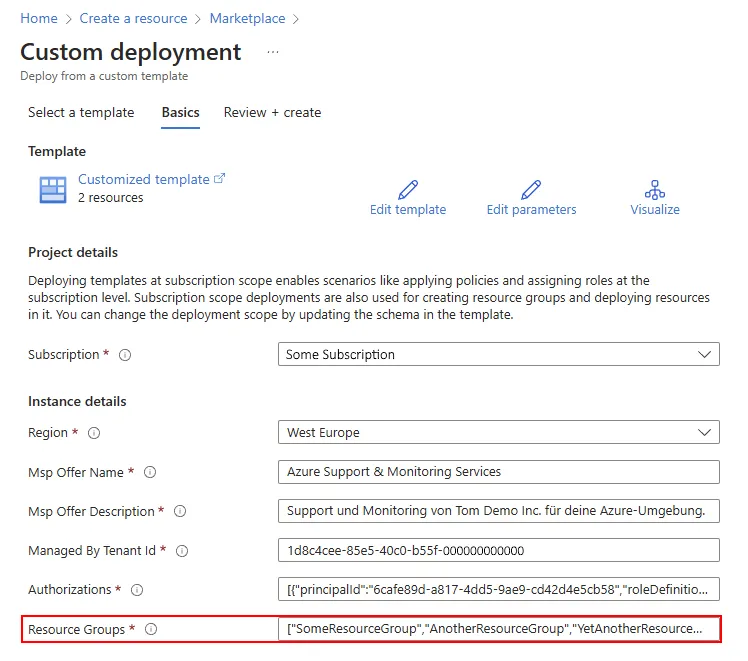 Figure 1: Lighthouse custom template deployment
Lighthouse in Action
After the Lighthouse ARM template is deployed in the customer’s tenant, the customer can see the offers and delegations in the Azure portal under Azure Lighthouse > Service Providers:
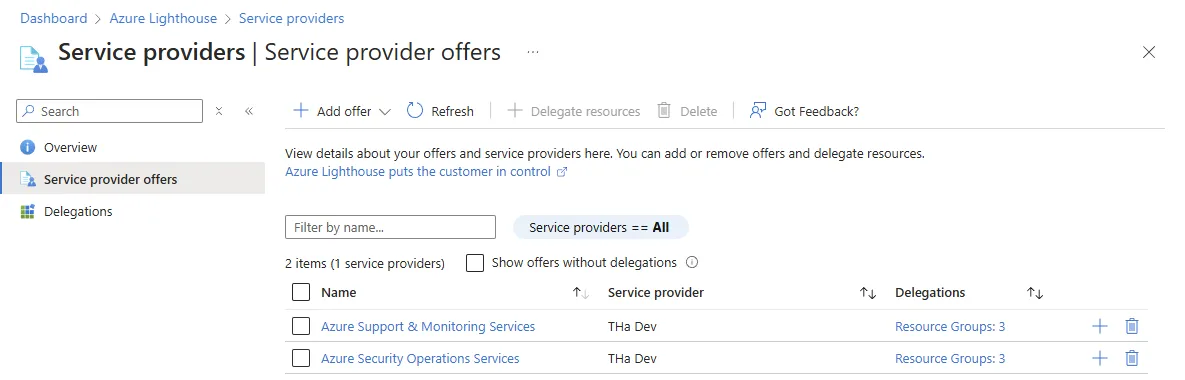 Figure 2: Lighthouse service providers
The service provider can also view its customers and their delegations in the Azure portal under Azure Lighthouse > My Customers:
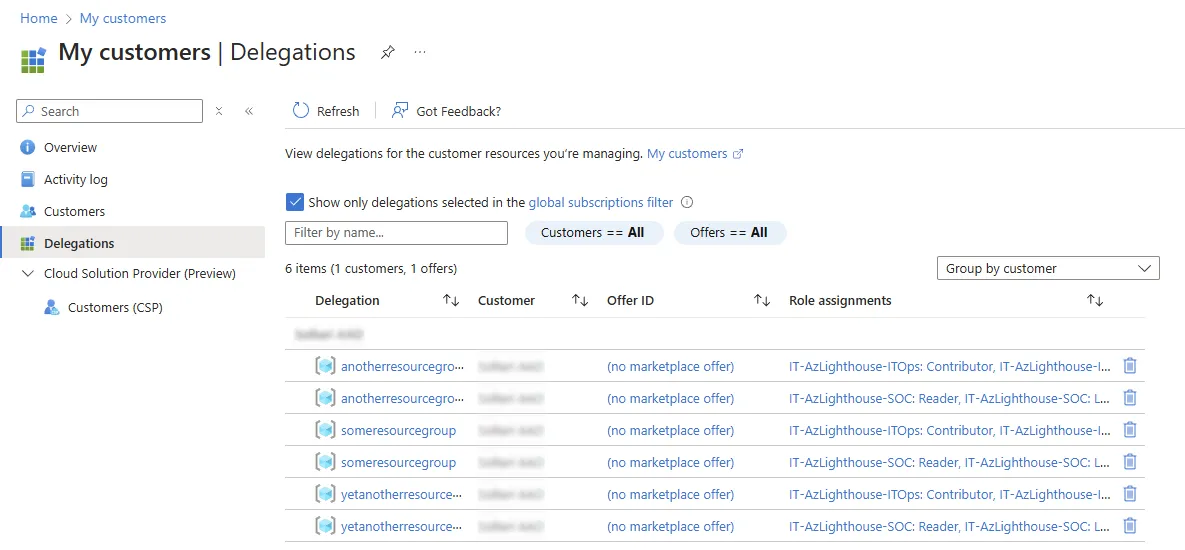 Figure 3: Lighthouse customers
The service provider’s staff can now access the customer’s delegated resources with all tools (portal, CLI, PowerShell) using the roles assigned to them. In the example, the user “AdeleV”, as a member of the SOC security group, can see the customer’s delegated resource groups:
adelev [ ~ ]$ az ad signed-in-user show -o table
DisplayName    GivenName    Mail                          PreferredLanguage    Surname
-------------  -----------  ----------------------------  -------------------  ---------
Adele Vance    Adele        adele.vance@dev.soltari.at    en                   Vance

adelev [ ~ ]$ az group list -o table
Name                     Location    Status
-----------------------  ----------  ---------
SomeResourceGroup        westeurope  Succeeded
AnotherResourceGroup     westeurope  Succeeded
YetAnotherResourceGroup  westeurope  Succeeded
Sources and Further Reading
- Concepts
- How-tos and guides
- Service provider: View and manage customers and delegates resources in the Azure portal
- Customer: View and manage service providers
- YouTube