
Azure Basics
This article covers the most important Azure fundamentals to give an overview of the platform and further resources.
Contents
Learning to work with Azure is an exciting and challenging journey that covers a broad range of topics - from identity management through security and governance to infrastructure, AI and resilience. This article covers the most important Azure fundamentals to give an overview of the platform and further resources.
ℹ️ This article was thoroughly revised in Feb. 2026.
Basics
Identity
In Azure, Microsoft Entra ID is the central identity platform, combining authentication, authorization and identity management for cloud and on-premises resources. By integrating single sign-on (SSO), multi-factor authentication (MFA) and Conditional Access, organizations can control access in a granular way while improving usability at the same time.
More details can be found in the learning path AZ-104: Manage identities and governance in Azure. For managing identities and roles, I recommend the Microsoft Entra ID documentation.
Security
To understand modern security in cloud environments like Azure, it helps to know two fundamental concepts: Zero Trust and Defense in Depth:
Zero Trust
The Zero Trust model assumes that no access is trustworthy by default. In Azure, Zero Trust is implemented across seven technology pillars, six of which (identities, endpoints, data, apps, infrastructure and network) serve as signal sources and as a control plane for enforcing security policies. The seventh layer, “visibility, automation and orchestration”, collects & visualizes signals and offers options for automation and orchestration to respond to security incidents.
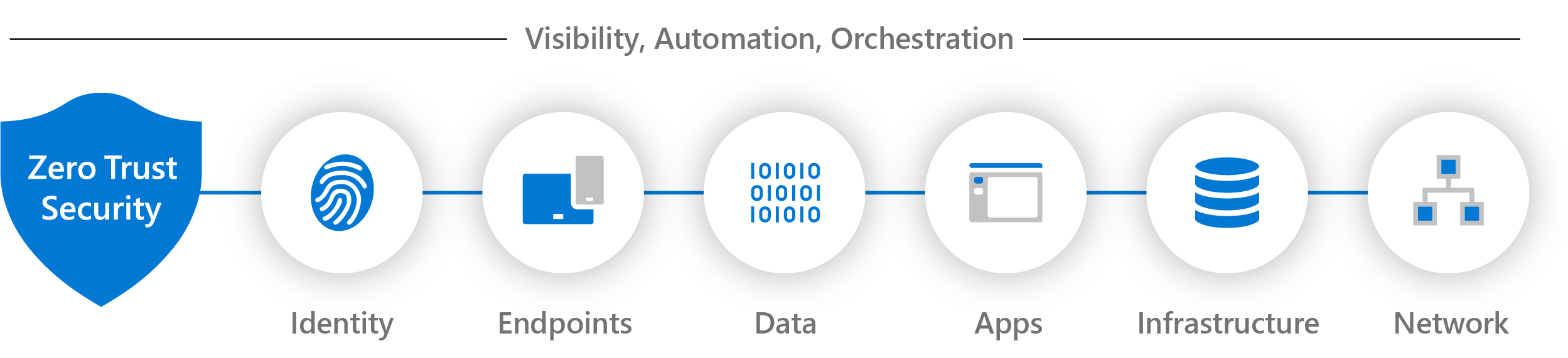 Figure 1: Zero Trust technology pillars
In the Zero Trust Guidance Center, Microsoft describes how to implement Zero Trust in Azure.
Defense in Depth
Another important concept is the Defense in Depth model, which uses multiple layers of protection - from physical access protection through network security to application protection and data security (see Fig. 2). Azure security services such as Azure Firewall, Network Security Groups and Azure Sentinel complement this strategy.
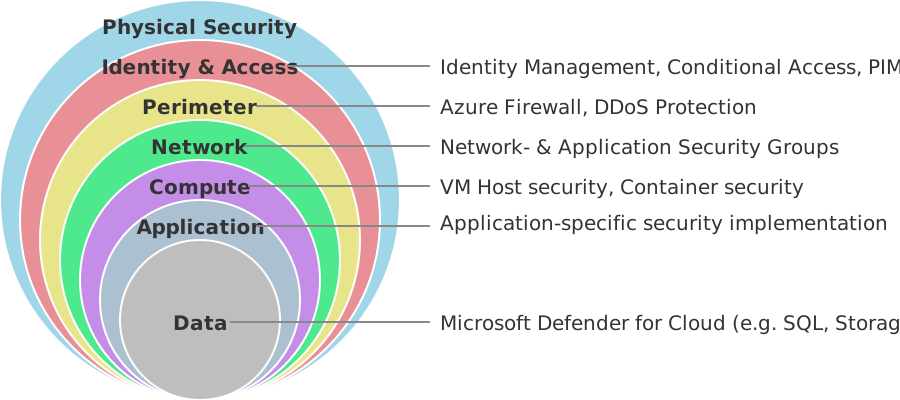 Figure 2: Defense in Depth, schematic
The YouTube video “Defense in depth security in Azure” by Microsoft Mechanics gives an overview of how the model is applied in Azure:
Governance
“Governance” means adhering to rules and policies - “conformity” or “compliance” - when configuring Azure resources. These policies can be anchored in law, for example in the GDPR and the EU AI Act, or defined internally by a company, for example to restrict the creation of certain Azure resources.
Compliance through Policies
Azure Policy enables the enforcement of corporate standards and compliance rules at the resource level. With Azure Policy, you define policies that are applied automatically to Azure resources and enforce the desired behavior.
John Savill goes into more detail on how Azure Policy works and how to configure it in his YouTube video “Functionality and Usage of Azure Policy”:
Compliance through Infrastructure as Code (IaC)
Another technique to enforce or facilitate compliance is to use Infrastructure as Code. Azure Resource Manager (ARM) templates allow declarative provisioning and versioning of infrastructure. Well-known tools such as Bicep, Terraform, OpenTofu and Pulumi build on ARM and make it easier to define IaC.
The following video by IBM is a good introduction to Infrastructure as Code:
Infrastructure
Azure offers a wide range of compute services such as virtual machines, container-based environments (Azure Kubernetes Service, Azure Container Apps), Azure Functions and Azure App Service.
For networking, there are Azure Virtual Network, Azure Load Balancer, Azure Firewall, NAT Gateway and Azure Application Gateway.
Azure Storage includes Blob, File, Queue and Table Storage as well as various database solutions.
AI
Azure offers numerous AI services such as Azure Cognitive Services, Azure OpenAI and Azure Machine Learning. They enable text and image analysis, speech and translation capabilities, and the development of your own models. For beginners, there are interactive learning paths on AI technologies, for example Azure AI Fundamentals.
Since 2025, the Azure AI services have been bundled in the Azure AI Foundry platform. Here is a compact overview graphic of AI Foundry:
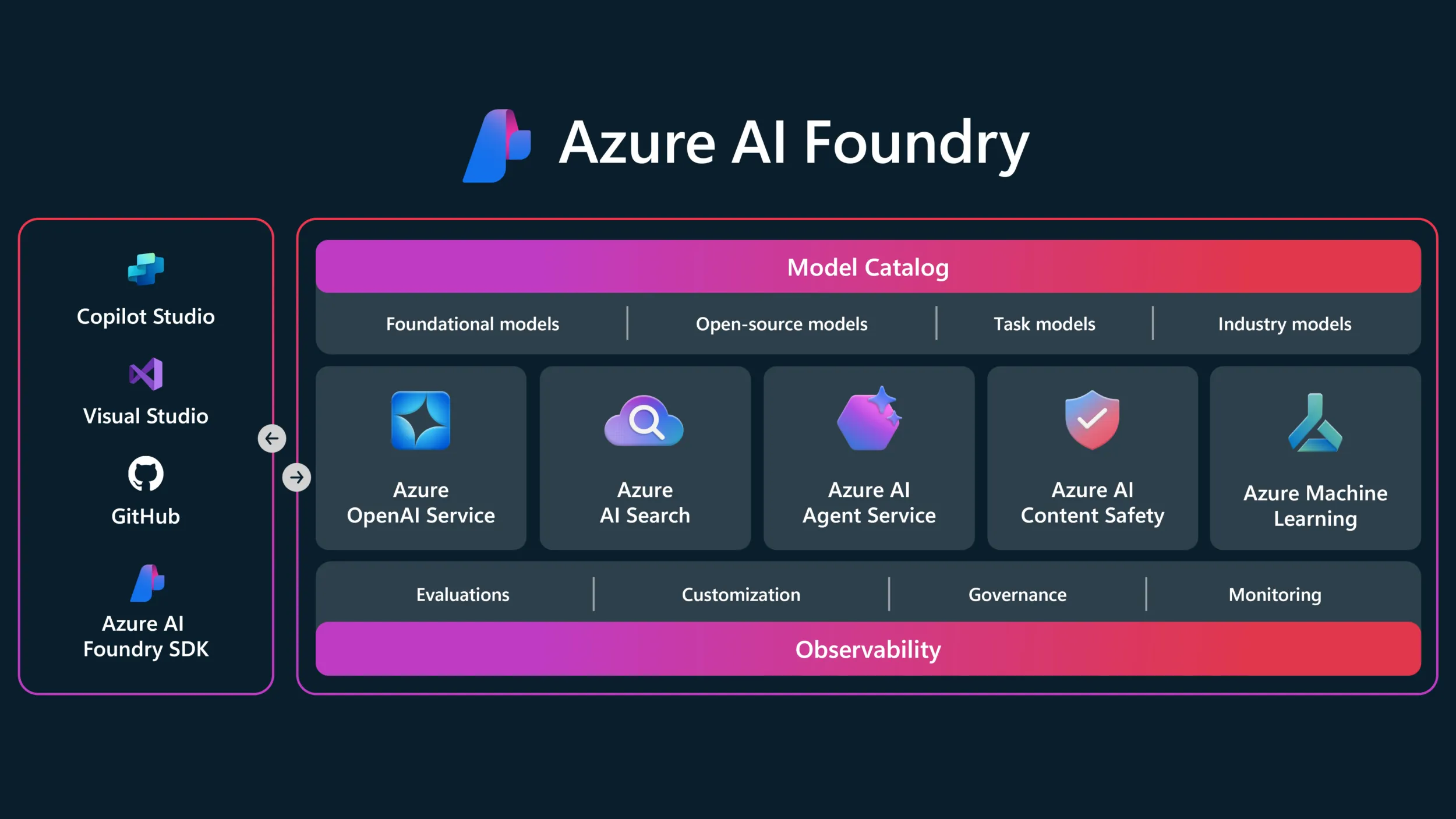 Figure 3: Azure AI Foundry overview
Resilience and Fault Tolerance
Azure services run in geographically distributed data centers that reduce latency and provide redundancy. Each Azure region consists of several such data centers and is assigned to a specific geography (e.g. Europe or the United States), which serves as a data residency boundary. The relationships between geography, region and data residency are described in more detail under Azure geographies.
Each Azure region consists of several isolated data centers, the so-called Availability Zones, which ensure high availability and fault tolerance. In addition, some regions are coupled as region pairs to simplify certain disaster recovery scenarios. Figure 4 shows the relationship between geographies, regions and availability zones schematically:
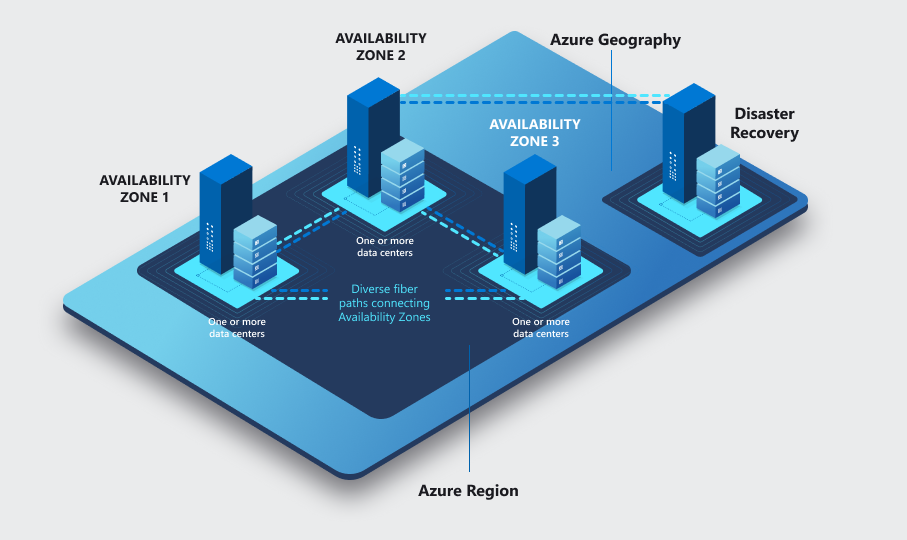 Figure 4: Azure Geography - Region - Availability Zone
To make business applications fault tolerant, it is not enough to make the underlying infrastructure resilient. The applications themselves must also be designed to handle failures. Azure offers various services and features that support the design of fault-tolerant applications. A good first stop is the Azure reliability documentation and the reliability design principles in the Azure Well-Architected Framework.
Using Azure & Managing Azure Resources
Subscription and Costs
To use Azure, you need an Azure subscription. For beginners, Microsoft offers a free subscription (Azure free account) with 200 USD credit for 30 days, which additionally makes some services available for free for 12 months. Alternatively, a Pay-As-You-Go subscription can be used, which also includes a number of free services.
Developers with a Visual Studio or MSDN subscription get an Azure subscription with 50 to 150 USD of monthly credit for learning, testing and development. All details are described under Monthly Azure credits for Visual Studio subscribers.
Using the Azure Portal
The Azure Portal (portal.azure.com) is a good first stop for creating, managing and monitoring Azure resources. It offers a user-friendly interface with dashboards, built-in tools and a search function to quickly access services. With the help of dashboards and favorites, the portal can be adapted to your own needs.
In the video “Getting started in the Azure Portal” on the Microsoft Azure Developers YouTube channel, Eric Boyd explains the basics of navigating and using the Azure Portal:
An often underrated tool in the Azure Portal is Azure Advisor, which offers recommendations for optimizing your Azure resources. Azure Advisor continuously analyzes the configuration and usage of resources and gives recommendations in the areas of cost optimization, performance, security and reliability. The documentation Introduction to Azure Advisor is a good starting point for using this tool.
Using Azure Cloud Shell
Azure Cloud Shell is a browser-based shell environment that supports PowerShell and Bash. It offers persistent storage, an integrated VS Code editor for scripts and access to Azure CLI, Azure PowerShell and other tools. Cloud Shell makes it possible to manage Azure resources with scripts (e.g. the Azure CLI) directly from the browser, without having to install local tools. It is a handy option for managing Azure resources from anywhere.
Gwyneth Peña-Siguenza explains how to use Cloud Shell in her YouTube video “How to access and use the Azure Cloud Shell”:
AI Assistance with Azure Copilot
The Azure Copilot integrated into the Azure Portal uses AI to make context-aware suggestions, analyze errors and generate scripts. Azure Copilot can only access resources that the user also has access to, and offers guided troubleshooting.
Azure Documentation, Learning Material and Certifications
Using Microsoft Learn
Microsoft Learn (learn.microsoft.com) is the central platform for learning content on Microsoft technologies. It offers interactive courses, certification roadmaps and learning paths for various roles. Microsoft Learn also contains the official Azure documentation with comprehensive information on all Azure services, guides and best practices, as well as all other Microsoft products and technologies.
Staying Up to Date
Azure is constantly evolving. The Azure Updates blog keeps you informed about new features, updates and security warnings. Ongoing updates are also provided, for example, by the YouTube channels Microsoft Azure and John Savill’s Technical Training.
Azure Certifications for Beginners
Certifications such as AZ-900 Azure Fundamentals, SC-900 Azure Security Fundamentals and AI-900 Azure AI Fundamentals are ideal starting points for Azure newcomers. Each certification offers a structured learning path and exam information: